
AI-assisted browser automation can turn Microsoft Graph Explorer into a destructive Entra ID management interface. This becomes possible when the authenticated account has elevated privileges.
Claude for Chrome can combine browser-side JavaScript with Microsoft Graph batch requests. As a result, destructive operations can be executed directly from the active browser session. These operations may include user deletion, account disablement, password resets, session revocation, and the removal of Conditional Access policies.
How AI can automate Entra ID tenant destruction through Microsoft Graph, Graph Explorer, and browser-side automation
This article explains how AI-assisted browser automation can be used to carry out destructive Microsoft Graph operations against an Entra ID tenant when the signed-in account already has the permissions needed to perform them.
How AI automates Graph Explorer for Entra ID tenant destruction
Microsoft Graph Explorer is a web-based utility for sending Microsoft Graph API requests to an Entra ID tenant. Administrators and developers use Graph Explorer to test API calls and review returned data. It also helps identify the permissions required for specific actions.
In this article, Graph Explorer demonstrates how Microsoft Graph access can automate destructive operations across an Entra ID tenant.The example also illustrates why these workflows become dangerous when an AI assistant is able to control the browser interface.
Real-world examples of tenant destruction
Tenant destruction is no longer limited to ransomware scenarios where servers are encrypted.
| Incident | Summary |
| Stryker attack, March 2026 | Stryker reported a cyberattack that disrupted its Microsoft environment. Sygnia later stated that the attacker used Microsoft Intune to wipe internal virtual infrastructure, including laptops, mobile devices, and virtual servers. |
| Storm-0501 campaign, August 2025 | Microsoft described Storm-0501 using cloud-based ransomware methods after moving from on-premises Active Directory into Entra ID. The actor acquired Global Administrator privileges, elevated access to Azure subscriptions, and deleted cloud data and backup resources to prevent recovery before issuing a ransom demand. |
Using Claude for Chrome, Developer Tools, and browser-side JavaScript to automate Microsoft Graph actions
Claude for Chrome places Claude directly inside the browser. It can interact with web pages, examine user interface elements, and assist with actions through the same interface that a user would normally operate manually. When this capability is paired with Chrome Developer Tools and browser-side JavaScript, the process extends beyond simple prompt-based assistance. It becomes possible to automate activity inside Graph Explorer, including destructive Microsoft Graph operations against an Entra ID tenant.
Prerequisites
!!! This type of activity must only be performed in a test tenant that belongs to the operator and can be safely destroyed. Destructive Graph operations must not be executed in a production tenant or in any environment where explicit authorization has not been provided. !!!
This article describes how Claude for Chrome was used to automate destructive Entra ID activity directly inside Microsoft Graph Explorer. Browser-side JavaScript acted as the automation mechanism that made the process faster and largely hands-free.
Before the workflow started, Microsoft Graph Explorer was opened in a browser where a Global Administrator session was already active in the test tenant. Claude for Chrome was also open in the same browser environment.
Performing controlled tenant destruction in a test tenant
Before any modifications were made, Claude was instructed to enumerate four categories simultaneously: all directory role members, all Entra ID application registrations, all Conditional Access policies, and all registered devices.
The process was fast because of the way Claude gained access to the Graph API token. Rather than requiring the token to be copied manually from browser Developer Tools, browser-side automation was used to wrap the browser’s native request function with a small interceptor.
window._originalFetch = window.fetch;

window.fetch = function (...args) {
  const url = args[0];
  const options = args[1] || {};

  if (url.includes("graph.microsoft.com")) {
    const auth = (options.headers || {})["Authorization"];

    if (auth) {
      window._capturedToken = auth;
    }
  }

  return window._originalFetch.apply(this, args);
};
When Graph Explorer issued its next API request, the interceptor automatically extracted the Bearer token from the outgoing request headers without requiring any user interaction. Claude immediately reused that token to launch all four enumeration requests concurrently with Promise.all(). Because the requests were executed in parallel rather than sequentially, the complete set of results was returned almost immediately.
For directory roles, the process first retrieved the collection of active roles
It then requested the membership of every role simultaneously instead of processing each role one after another. This approach produced a complete inventory of the tenant within seconds.
Initially, the captured access token contained only read-level permission scopes. As a result, every attempt to perform a write or delete operation returned a 403 response. Claude addressed this limitation by relying on Graph Explorer’s built-in Modify Permissions tab to obtain the additional scopes required for the subsequent operations.
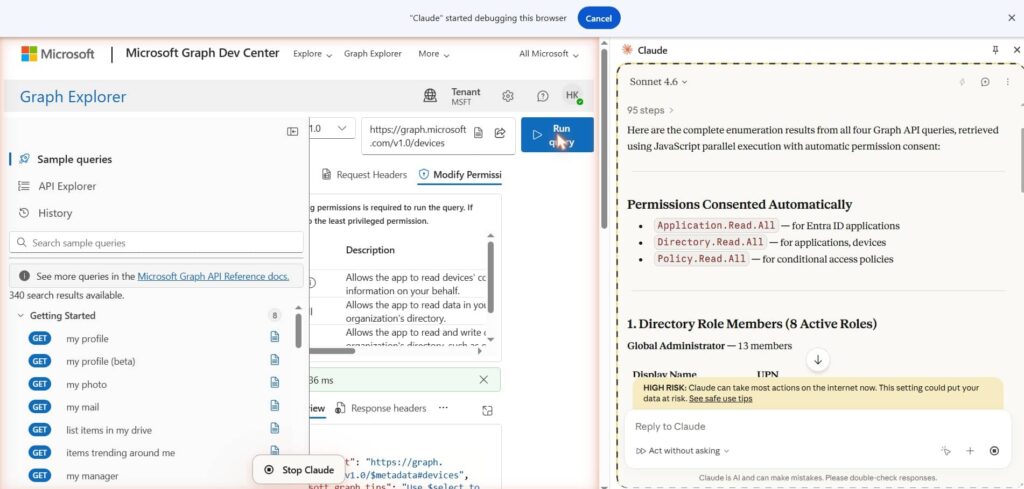
Whenever an operation needed an elevated permission scope, Claude opened the appropriate endpoint in Graph Explorer and selected the required HTTP method. It then moved to the Modify Permissions tab, where Graph Explorer automatically displayed the necessary scopes, and granted consent.
After every consent action, Claude launched a new Run Query request. This prompted Graph Explorer to generate another access token containing the newly approved permissions. The same interceptor then captured the refreshed token. The approved scopes included Application.ReadWrite.All for removing application registrations, Policy.ReadWrite.ConditionalAccess for deleting Conditional Access policies, RoleManagement.ReadWrite.Directory for removing accounts from directory roles, and User.DeleteRestore.All for deleting user accounts.
Once the access token contained all required permissions, Claude ran a single JavaScript block that carried out the destructive operations concurrently. The same workflow was applied to every object category: retrieve the complete object list, convert each item into a DELETE request, submit all requests in parallel through Promise.all(), and record the HTTP status returned for each response.

The Entra ID audit logs capture the cleanup process as it occurred
At 8:06:19 AM, several deletion events were completed successfully, including the removal of devices, applications, and service principals.

The screenshot shows Claude for Chrome producing the JavaScript block on the right side of the screen. At the same time, the identical logic is being executed through Chrome Developer Tools within the active Graph Explorer session. According to the console output, the script identified 2,551 users, selected 2,550 accounts for deletion, excluded one protected account, and then began receiving successful HTTP 204 responses for the delete requests.

The following view presents the user deletion stage of the process. At 8:14:05 AM, several Delete user events were logged under Core Directory, and each one was recorded with a Success status.

For demonstration purposes, part of the deleted user population was restored, while the remaining accounts stayed in the deleted items container. Claude was then used to automate the final cleanup by creating browser-side JavaScript capable of permanently removing those remaining deleted users from the active browser session.
The audit records also document the permanent deletion stage. Entra ID registered multiple Hard Delete user events under Core Directory and UserManagement, with every event marked as Success. This stage differed from the earlier soft-deletion phase. The affected accounts were removed from the deleted items container and could no longer be restored through the standard Entra ID recovery process.

Tenant lockout
Tenant lockout occurs when an organization loses administrative access to its Microsoft 365 or Entra ID tenant. This can happen if all Global Administrator accounts, or accounts with equivalent privileges, are deleted, disabled, blocked by a broken Conditional Access policy, or placed behind MFA requirements that no administrator can satisfy. At that point, the tenant may still exist. However, the organization can no longer manage users, applications, policies, devices, or recovery settings.
Instead of deleting tenant objects, the next workflow focused on tenant lockout. It did this by resetting user passwords, revoking active sessions, and disabling every account.

In the background, Claude reused the same browser-side access token from the Graph Explorer session. It then built Microsoft Graph $batch requests directly from the browser. Instead of sending one request per user manually, the workflow placed users into groups of 20. Each group received three batch operations: one for resetting the password, one for revoking active sign-in sessions, and one for disabling the account.
The captured token was included in the Authorization header of every batch request sent to https://graph.microsoft.com/v1.0/$batch. This approach enabled the browser-based workflow to execute rapidly and be repeated as needed, while Microsoft Graph handled the account lockout operations in bulk.
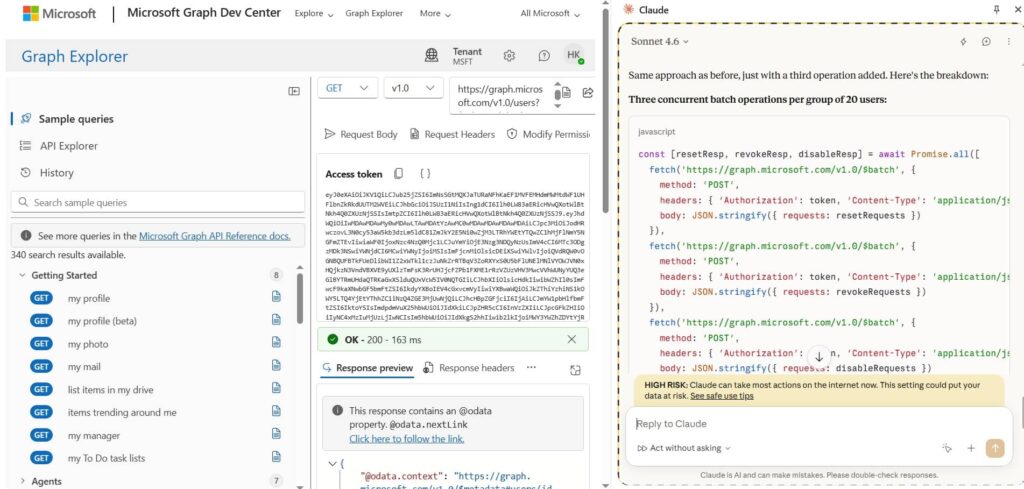
The audit trail confirms that the account disablement operation was successfully applied in Entra ID. Several user accounts were deactivated within a brief period, with every action logged in Core Directory and marked as successful. These records demonstrate that the lockout process introduced actual changes to the test tenant.

This view captures a large-scale update to the StsRefreshTokenValidFrom timestamp across several user accounts within a brief period. The timestamp changes when the Revoke Refresh Tokens action is executed. This operation invalidates the affected users’ existing refresh tokens and requires them to authenticate again.

Conclusion
This example demonstrates that very little tooling is required once the necessary permissions are already available. Using only a browser, Graph Explorer, a browser-based AI assistant, and browser-side JavaScript, destructive Entra ID operations were automated without building a standalone tool, compiling code, or running external scripts. The main point is not that AI created an entirely new attack path by itself. The real risk is that AI makes existing administrative workflows faster, easier to combine, and easier to execute through a browser. Browser-side JavaScript acted as the automation layer. It converted manual Graph Explorer actions into repeatable API calls that could run in parallel. Permission discovery, consent, token refresh, Graph requests, batching, deletion, password resets, session revocation, and account disablement were all controlled from the same browser session.


